
If you’ve ever tried to start a business, verify a company’s legitimacy, or untangle who actually owns an LLC in Oklahoma, you’ve probably landed on one essential tool: the Oklahoma Secretary of State business search. It sounds bureaucratic, maybe even boring—but in the real world, this single search tool can save you from legal headaches, bad deals, naming conflicts, and costly mistakes.
Whether you’re an entrepreneur checking name availability at 2 a.m., a freelancer vetting a new client, a lawyer doing due diligence, or a journalist tracking down business records, this guide will walk you through everything—clearly, practically, and without the usual government-site confusion.
I’ve used state business searches across the U.S. for years, and Oklahoma’s system has its own quirks, strengths, and hidden shortcuts. By the end of this article, you’ll know not just how to use the Oklahoma Secretary of State business search, but how to use it strategically.
Understanding the Oklahoma Secretary of State Business Search (Plain English Version)
At its core, the Oklahoma Secretary of State business search is a public database maintained by the Oklahoma Secretary of State. It exists to give anyone access to official records for businesses registered in Oklahoma.
Think of it like a DMV—but for businesses instead of cars.
Every LLC, corporation, nonprofit, limited partnership, and registered trade name in Oklahoma leaves a paper trail. That trail is digitized and searchable. The business search lets you look up:
- Legal business names
- Filing status (active, inactive, dissolved)
- Formation dates
- Registered agents
- Official addresses
- Filing history and document types
This matters because in Oklahoma (as in most states), businesses only exist legally once they’re registered with the Secretary of State. If it’s not in the database, it doesn’t legally exist—no matter how professional the website looks.
For beginners, here’s a relatable analogy:
If Google Maps shows whether a restaurant exists at a location, the Oklahoma Secretary of State business search shows whether a business legally exists in the state.
Why the Oklahoma Secretary of State Business Search Matters More Than You Think

Most people underestimate this tool until something goes wrong.
Imagine these real-world scenarios:
- You sign a contract with a company that later “disappears.”
- You file an LLC name, only to get rejected weeks later because it’s already taken.
- You hire a vendor who claims to be incorporated—but isn’t.
- You want to sue or collect payment but can’t find the registered agent.
The Oklahoma Secretary of State business search prevents all of that.
Here’s who benefits most:
- Entrepreneurs & startups checking name availability
- Investors verifying companies before funding
- Freelancers & agencies validating clients
- Lawyers & paralegals doing compliance checks
- Journalists & researchers confirming corporate records
- Accountants & CPAs reviewing entity status
In Oklahoma specifically, compliance lapses can lead to administrative dissolution. That means a business still “operates” but isn’t legally recognized. The search tool exposes this instantly.
What Information You Can Find Using the Oklahoma Business Search
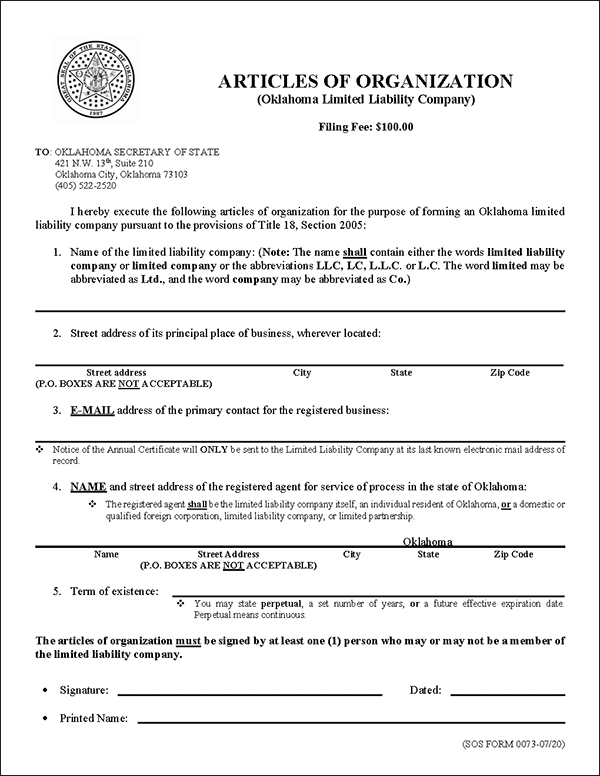
Once you run a search, you’ll see far more than just a name. Each result is a snapshot of a company’s legal life.
Here’s what typically appears:
- Legal Entity Name – The exact registered name, punctuation included
- Entity Type – LLC, Corporation, Nonprofit, LP, etc.
- Status – Active, Inactive, Dissolved, Withdrawn
- Formation Date – When the entity was officially created
- Registered Agent Name – The legal contact for lawsuits and notices
- Registered Office Address – Physical Oklahoma address
- Filing History – Amendments, annual certificates, mergers
This information is legally reliable. Courts, banks, and government agencies rely on it daily.
One pro tip: status matters more than name. An “Inactive” or “Dissolved” business can’t legally operate or enter contracts—even if it still has a website and social media.
Step-by-Step: How to Use the Oklahoma Secretary of State Business Search Correctly
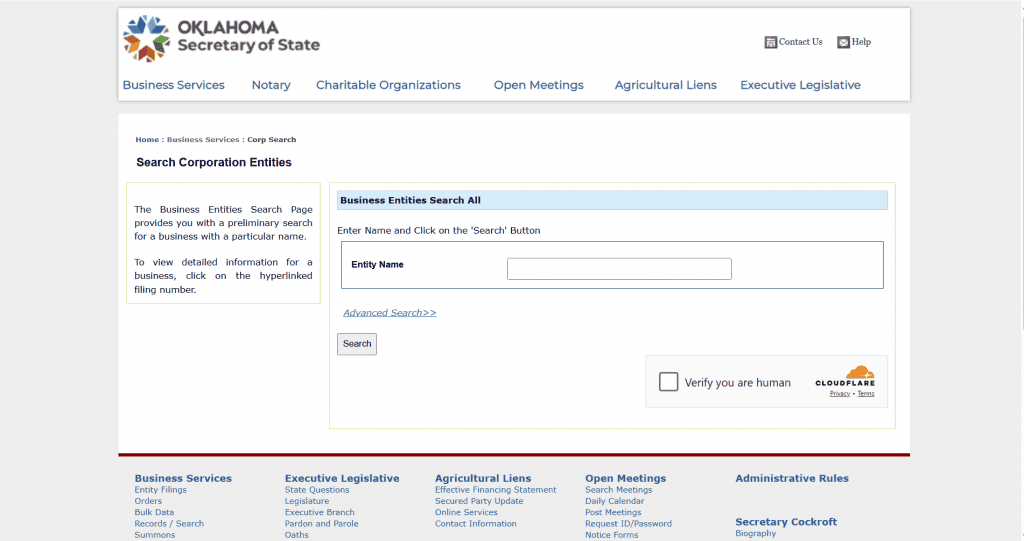
Using the tool is straightforward, but using it well takes a little know-how.
Step 1: Access the Official Search Page
Always start from the official Secretary of State website. Avoid third-party sites that scrape outdated data or hide details behind paywalls.
Step 2: Choose Your Search Method
You can search by:
- Business name (full or partial)
- Filing number
- Registered agent name
For most users, partial name searches work best. You don’t need “LLC” or “Inc.” to get results.
Step 3: Review Search Results Carefully
You’ll often see multiple businesses with similar names. Don’t panic—this is normal.
Click each relevant result and compare:
- Entity type
- Status
- Formation date
Step 4: Open the Business Detail Page
This is where the gold lives. Read everything, especially:
- Status
- Registered agent
- Last filing date
Step 5: Download or Note Key Details
For legal, financial, or compliance purposes, save:
- Filing number
- Agent name
- Address
Best practice: screenshot or PDF the page if you’re documenting due diligence.
Name Availability Checks: Using the Search Before You Form an LLC
One of the most common uses of the Oklahoma Secretary of State business search is checking business name availability.
Here’s how experienced filers do it:
- Search the core name, not the full version
- Try plural and singular variations
- Remove punctuation and special characters
- Look for “confusingly similar” names
For example, if you want:
Red River Consulting LLC
Also search:
- Red River Consult
- Red River Consultants
- Red River Consulting Group
Oklahoma rejects names that are too similar, not just identical.
This one step can save weeks of delays and refiling fees.
Registered Agents: Why This Detail Is Critical
The registered agent is the person or company legally authorized to receive lawsuits and official notices.
When you look up a business using the Oklahoma Secretary of State business search, the registered agent tells you:
- Who legally represents the company
- Where legal papers must be delivered
- Whether the business is maintaining compliance
Red flags to watch for:
- Missing agent
- Out-of-state addresses (for OK-only entities)
- Frequent agent changes
If you’re dealing with a business professionally, always verify the agent. It’s your legal lifeline if things go sideways.
Business Status Explained: Active vs Inactive vs Dissolved
Status terminology trips up a lot of people. Here’s the plain-English breakdown:
- Active – The business is compliant and legally operating
- Inactive – The business failed to file required documents
- Dissolved – The business legally no longer exists
- Withdrawn – Out-of-state entity left Oklahoma
Only Active entities should be trusted for contracts, payments, or partnerships.
If a business is inactive, it may still appear operational—but legally, it’s on thin ice.
Advanced Use Cases: Due Diligence, Legal Research, and Risk Reduction
Beyond basic searches, professionals use this tool for deeper analysis.
Due Diligence
Before acquisitions or investments, the search reveals:
- Entity age
- Filing consistency
- Structural changes
Legal Preparation
Attorneys confirm:
- Proper service address
- Legal standing
- Ownership continuity
Fraud Prevention
Consumers and freelancers check:
- Fake businesses
- Recently dissolved entities
- Name hijacking attempts
In Oklahoma, business fraud often involves expired LLCs still collecting payments. The business search exposes this instantly.
Tools, Alternatives, and Third-Party Platforms Compared
While the Oklahoma Secretary of State business search is free and authoritative, it’s not the only option.
Official Tool (Recommended)
Pros:
- Free
- Real-time data
- Legally reliable
Cons:
- Basic interface
- No alerts or monitoring
Paid Business Databases
Examples include compliance platforms and corporate data services.
Pros:
- Monitoring alerts
- Multi-state tracking
- Document storage
Cons:
- Monthly fees
- Sometimes delayed updates
Expert recommendation: Use the official Oklahoma search first, then layer paid tools only if you manage many entities.
Common Mistakes People Make (and How to Avoid Them)
Even smart people slip up here.
Mistake 1: Assuming Name = Legitimacy
Fix: Always check status, not just existence.
Mistake 2: Ignoring Registered Agent Info
Fix: Confirm the agent is current and valid.
Mistake 3: Using Third-Party Search Sites
Fix: Stick to the official Secretary of State database.
Mistake 4: Not Rechecking Before Signing
Fix: Re-run the search right before contracts or payments.
These small checks prevent big problems.
Real-World Example: A Freelancer Saves Thousands
A designer I worked with nearly signed a $12,000 contract with an Oklahoma-based “agency.” A quick Oklahoma Secretary of State business search showed the company had been dissolved six months earlier.
Result?
No contract. No unpaid invoices. No legal chase.
That’s the power of five minutes of research.
Compliance, Annual Certificates, and Ongoing Monitoring
Oklahoma requires regular filings to maintain good standing.
The business search shows:
- Last annual certificate filed
- Gaps in compliance
- Patterns of neglect
If you own a business, check your own listing at least once a year. It’s like checking your credit report—boring but essential.
The Oklahoma Secretary of State Business Search for Nonprofits
Nonprofits are fully searchable too.
You can verify:
- Active charitable status
- Legal name accuracy
- Filing history
This is especially important for donors, grant writers, and journalists verifying legitimacy.
How This Tool Fits Into a Bigger Business Research Strategy
Smart professionals don’t rely on one source.
Pair the Oklahoma Secretary of State business search with:
- IRS EIN verification
- County clerk records
- Federal trademark searches
Together, they paint a complete picture.
Conclusion: Why This One Search Tool Is Non-Negotiable
The Oklahoma Secretary of State business search isn’t just a database—it’s a trust filter. It protects entrepreneurs, professionals, and consumers from misinformation, fraud, and costly mistakes.
If you’re doing business in Oklahoma in any capacity, this tool should be part of your routine. Five minutes of searching can save months of regret.
Bookmark it. Use it. Trust it.
If this guide helped you, consider sharing it—or drop a comment with how you use the business search in your work.
FAQs
Is the Oklahoma Secretary of State business search free?
Yes. The official search tool is completely free to use.
Can I see who owns an Oklahoma LLC?
You can see registered agents and sometimes managers, but ownership details are limited.
How often is the database updated?
Updates occur in near real time after filings are processed.
Can I reserve a business name through the search?
No, but the search helps you confirm availability before filing.
Does the search include dissolved businesses?
Yes. Dissolved and inactive entities remain searchable.